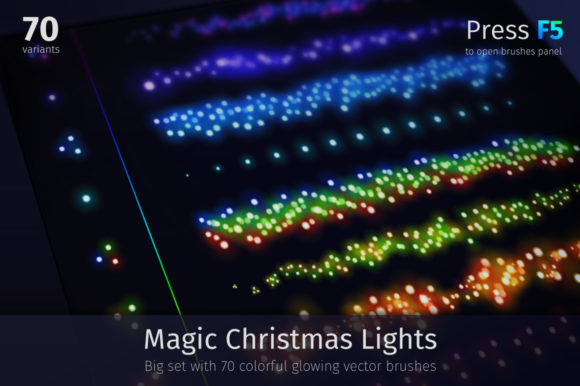
Illuminate Your Designs: The Magic Christmas Lights Brush Set
When the holiday season arrives, the pressure to create visuals that feel both nostalgic and high-end is immense. We often struggle to capture that specific, ethereal glow of festive lighting in digital art. This is where the Magic Christmas Lights set steps in, offering a solution that bridges the gap between raw illustration and polished, professional holiday graphics. It is not merely a collection of static images; it is a dynamic toolkit designed to inject warmth and energy into your creative projects.
Understanding the Asset: More Than Just Sparkle
At its core, this collection provides a robust library of 70 colorful, glowing elements designed specifically for celebratory contexts. However, the true value lies in its versatility. The package includes a mix of design assets tailored for modern digital design workflows. You are looking at 16 EPS10 files for maximum scalability, three fully editable Ai files for Adobe Illustrator users, and—crucially for those without vector software—over 186 high-resolution, transparent PNG files.
The visual style of these assets leans heavily into abstract blurred aesthetics. They mimic the bokeh effect of Christmas lights, creating a sense of depth and motion. This "magic" brush approach allows you to apply pressure-sensitive strokes that vary in intensity, much like using a physical brush on canvas. The result is a creative font of light—typography and illustration that feels alive and energetic rather than flat and static.
Technical Flexibility for Designers
For professionals using Adobe Illustrator, the inclusion of CS5-compatible files is a significant advantage. The items are not expanded; they remain fully editable vector objects. This means you can deconstruct fireworks, banners, and brush strokes to fit specific layouts. Furthermore, the ability to change the color stroke allows you to match these lights precisely to a client’s brand identity or a specific color palette, ensuring consistency across all marketing materials.
Even if you are a crafter or small business owner working in Canva or Photoshop, the transparent PNGs offer print-resolution quality. This inclusivity ensures that whether you are creating a complex vector illustration or a quick social media post, the Magic Christmas Lights set remains accessible.
Strategic Application in Branding and Marketing
How do these assets influence your audience? Visual hierarchy is critical in holiday design. When a user sees a social media graphic or a landing page, their eyes are naturally drawn to high-contrast, glowing elements. Using these lights to frame a call-to-action or highlight a key message can significantly increase engagement.
Consider the impact on brand perception. A brand that utilizes high-quality, dynamic lighting effects often appears more festive, generous, and attention-to-detail oriented. For packaging design, a subtle overlay of these blurred lights can transform a standard box into a premium gift item. In editorial design, such as a holiday magazine cover or a blog header, these elements provide the necessary "pop" to stand out in a crowded content feed.
Optimizing for Readability and Visual Appeal
While these assets are visually striking, they must be used with an understanding of readability. Because the lights are abstract and glowing, they work best as background elements or decorative borders rather than behind small body text.
The developer notes a crucial technical tip for achieving the best look: transparency modes. To get that authentic neon glow, you should experiment with blending modes in your design software. Setting the layer mode to Color Dodge, Hard Light, or Overlay changes how the light interacts with the underlying pixels. Color Dodge creates a harsh, bright flare, while Overlay offers a softer integration. Mastering this allows you to control the visual hierarchy, ensuring the lights enhance the design rather than overwhelming it.
Practical Workflow: Integrating the Set into Projects
Integrating these assets into your workflow is straightforward if you follow a structured approach. First, evaluate the project fit. If you are designing a corporate financial report, these assets likely won't fit. However, for web design during December, logo design for seasonal campaigns, or packaging design for retail, they are invaluable.
Here is a practical guide to using the set effectively:
- Test Font Pairings: These lights act as display font elements. Pair them with clean sans serif fonts for a modern look, or elegant serif fonts for a traditional holiday feel. The lights provide the flair, while the typography provides the information.
- Customize the Vectors: Don't just drag and drop. Use the pressure sensitive version of the brushes to create custom paths. This is particularly useful for illustrations where you need the light to follow a specific curve or character outline.
- Review Included Styles: The set includes specific assets like fireworks and banners. Use the banners for announcements and the fireworks for celebratory backgrounds.
- Commercial Licensing: Always verify the license for your specific use case, but these assets are designed for both personal and commercial application, making them a safe investment for small business owners.
Beyond the Holidays
While named for Christmas, the aesthetic of glowing, blurred light is universal. With color adjustments, these assets can be repurposed for New Year's Eve parties, music festival promotions, or even sci-fi themed web design. By changing the stroke color from warm reds and greens to cool blues and purples, you can create a cyberpunk or concert atmosphere. This adaptability ensures that your purchase provides value well beyond a single month of the year.
Ultimately, the Magic Christmas Lights set is about efficiency and quality. It allows content creators and designers to bypass the complex process of creating realistic light effects from scratch. By leveraging these pre-made, yet fully customizable brushes and PNGs, you can produce professional work that resonates with the spirit of the season, ensuring your projects not only look bright but also feel authentically magical.