Procreate Ink Splash Stamp: Adding Authentic Texture to Digital Art
There’s a certain energy that comes from working with real ink—the unpredictable splatter, the organic bleed, the raw texture that digital tools often struggle to replicate. For designers and artists using Procreate, bridging that gap between digital precision and analog authenticity is now simpler than ever. The Procreate Ink Splash Stamp set is a collection of 70 high-quality stamp brushes designed to inject that lively, handcrafted feel directly into your iPad artwork. This isn’t just another set of generic marks; it’s a toolkit for adding depth, movement, and personality to everything from hand lettering to full illustrations.
Understanding the Visual Appeal and Versatility
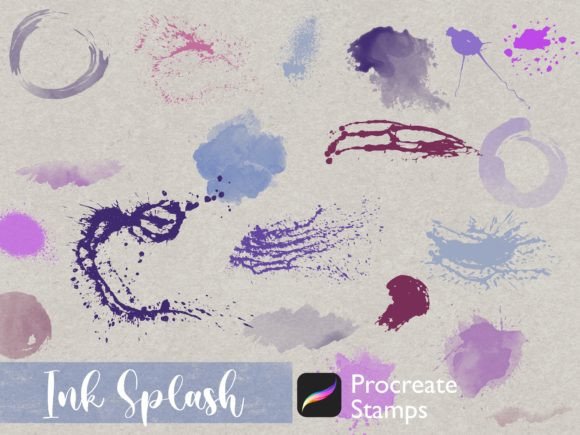
At its core, this collection is about visual texture and abstract form. The brushes are built from real ink experiments, capturing a range of effects from fine, spattered dots to bold, flowing splashes. Each stamp carries a unique character—some feel like a quick flick of a pen, others like a deliberate drip. This variety allows you to layer and combine marks to create complex, organic backgrounds or to accentuate specific elements in your composition. The personality here is decidedly artistic and expressive, leaning away from sterile digital perfection and toward a more human, tactile aesthetic.
Because they are stamps, their application is incredibly straightforward. You tap the canvas, and the mark appears, ready to be resized, rotated, or recolored. This makes them perfect for rapid experimentation. Want to see how a particular splash looks behind a logo? Stamp it. Need to add gritty texture to a vintage poster design? Stamp it. The Procreate Ink Splash Stamp set acts as a versatile design asset that can be adapted to countless creative scenarios. You can use them at full opacity for a strong, graphic statement or lower the opacity for a subtle, weathered effect. This flexibility is key to their practical value.
Where These Brushes Shine: Practical Applications
The real-world applications for these ink splash brushes are broad, touching nearly every area of visual communication. For hand lettering artists, they are indispensable. Use a splash to underline a bold headline, to fill the counter of a letter with texture, or to create a dynamic, exploded effect around a word. In illustration, they add environmental texture—think of the gritty feel of a cityscape, the organic chaos of a forest floor, or the atmospheric dust in a sunbeam. They can quickly establish mood and setting without hours of meticulous rendering.
Beyond illustration, consider their role in brand identity and marketing. A brand aiming for an authentic, artisanal, or edgy personality can use these textures in logo design mockups, on packaging design, or across social media graphics. They help break the monotony of clean, corporate visuals and can make a brand feel more approachable and creative. For editorial design, think of magazine layouts, book covers, or album art where ink splashes can add a dramatic, editorial flair. Even in web design, a subtle splash texture in a hero section or as a divider element can add depth and interest to a digital page.
Integrating Ink Splashes into Your Design Workflow
Using the Procreate Ink Splash Stamp set effectively is less about technical skill and more about thoughtful application. The first step is always to evaluate your project’s needs. Is the goal to add a focal point, to create background texture, or to enhance an existing composition? Start by stamping on a separate layer. This non-destructive approach allows you to experiment freely—move the splash around, try different colors, or erase parts of it without affecting your underlying artwork.
A crucial consideration is visual hierarchy. A large, high-contrast ink splash can easily dominate a design. Use these elements strategically to guide the viewer’s eye. For example, placing a vibrant splash behind a key piece of text can make that element pop. Conversely, using a low-opacity, monochromatic splash as a background texture can add sophistication without competing for attention. Always consider readability. If you’re using splashes near text, ensure there is enough contrast and separation so the words remain clear and legible.
Another practical tip is to combine and layer. Don’t just use one stamp. Layer different splashes from the set, varying their size, rotation, and color to create a more complex and natural-looking texture. You can also combine them with other Procreate brushes—like grainy shaders or dry media brushes—to build even richer surfaces. The set includes abstract shapes in different textures, so take the time to explore the full range. Some might be perfect for a gritty, industrial look, while others might feel more fluid and painterly.
Making the Most of Your Digital Toolkit
This collection is a prime example of a premium digital asset that saves creative professionals significant time. Instead of manually painting every splatter or scanning real ink experiments, you have a library of 70 ready-to-use, high-resolution stamps at your fingertips. This efficiency is invaluable for meeting deadlines and maintaining a productive workflow.
Remember, these are digital items delivered instantly, so you can start using them within minutes of purchase. The .brushset files are designed exclusively for Procreate, ensuring seamless integration with the app. Once imported, they sit conveniently at the top of your brush library for easy access.
Ultimately, the Procreate Ink Splash Stamp set is more than just a collection of marks; it’s a bridge to a more expressive, textured, and authentic style of digital creation. Whether you’re a freelance designer crafting a unique brand identity, a hobbyist exploring mixed-media art, or a content creator looking to elevate your visual content, these brushes offer a straightforward way to add that sought-after handcrafted quality. They empower you to break free from overly polished digital norms and introduce a dose of controlled chaos that can make your work stand out.