Sparkle and Shine: A Guide to Using iPad Sequins Brushes for Procreate
There’s a certain magic in the way light catches a sequin. It’s a micro-moment of brilliance, a tiny flash that draws the eye and adds a layer of texture and luxury to any surface. In the digital world, capturing that effect authentically can be a challenge. Many tools create a flat, uniform glitter that lacks the depth and character of the real thing. This is precisely where the iPad Sequins Brushes for Procreate collection excels. It’s not just about adding a sparkle; it's about embedding a tangible sense of dimension, glamour, and celebration directly into your digital canvas.
As a designer who works across various mediums, from branding to digital illustration, I'm always looking for assets that bridge the gap between the physical and the digital. This nine-brush pack is a perfect example. It moves beyond simple effects and offers a nuanced toolkit for artists, entrepreneurs, and creators. Each brush is engineered to behave with a distinct personality, giving you control over the final look and feel. The visual appeal is immediate: you get the rich luster of metallics, the playful chaos of confetti, and the subtle elegance of translucent shimmer. It’s a collection that understands the "why" behind the sparkle, allowing you to use it with intention and purpose.
Deconstructing the Brush Pack: More Than Just Glitter
To truly appreciate the value of this digital download, it helps to understand the variety within the pack. The creator has thoughtfully included different brush types to serve different creative goals. You aren’t just getting one generic "sparkle" tool; you're getting a versatile set of design assets.
The collection includes distinct categories that open up a world of possibilities:
- Metallic Brushes: These are your workhorses for creating a sense of luxury and high-end quality. Think of the polished finish on a foil-stamped logo or the gleam on a piece of jewelry in an illustration. They catch the light in a way that feels weighty and premium.
- Single Color Brushes: For when you need consistency. These brushes apply a uniform color, making them perfect for creating branded patterns, adding subtle texture to a background, or designing digital stickers where color accuracy is key.
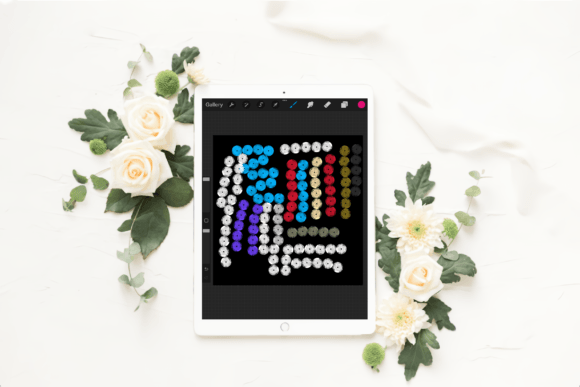
- Multi-Colored Brushes: This is where the fun begins. These brushes are designed to pull from your selected color palette, creating a dynamic and varied effect with every stroke. As noted in the product details, the colors will change based on your active palette selection, offering incredible versatility for projects like party invitations, festival posters, or celebratory social media graphics.
- Translucent Brushes: These are for more subtle, atmospheric effects. They allow the underlying layers of your artwork to show through, creating a soft, ethereal shimmer. They are fantastic for adding a dreamy quality to portraits, creating soft-focus backgrounds, or adding a delicate frost effect.
Additionally, specific styles like Confetti and Straight sequins provide even more control. The confetti style mimics the scattered, joyful look of falling glitter, perfect for invitations and party-themed content. The straight sequin style, on the other hand, offers a more ordered, textile-like pattern, ideal for creating fabric textures or sleek, repeating backgrounds. This level of detail elevates the pack from a simple effect to a genuine premium font… or in this case, a premium brush collection for digital artistry.
From Branding to Social Media: Practical Applications
Knowing what the brushes do is one thing; knowing where to use them is what turns a good asset into a great one. This is where strategy comes into play. The iPad Sequins Brushes for Procreate are incredibly versatile, but their impact is maximized when used with a clear creative intent.
Elevating Brand Identity and Logo Design
For a small business owner or entrepreneur, creating a memorable brand identity is crucial. A touch of sequin can communicate celebration, luxury, or playfulness, depending on the application. Imagine using a metallic sequin brush to create a textured background for a business card or a shimmering accent in a digital logo for a cosmetics brand, event planning service, or boutique. It adds a tactile quality that a standard sans serif font or flat color simply cannot achieve. It’s a subtle nod to the sensory experience of your brand.
Crafting Scroll-Stopping Social Media Graphics
In the fast-paced world of social media, you have a split second to capture attention. A static post can easily get lost in the feed. By using these sequin brushes, you can add movement and light to your graphics. A headline for a flash sale, a celebratory announcement, or a product feature can be instantly elevated with a stroke of confetti or a glint of metallic shine. This is a practical way to make your content more engaging and shareable, turning a simple graphic into a piece of eye-catching visual content that stands out.
Enhancing Editorial and Packaging Design
Think beyond the screen. For digital publishers, these brushes can add a festive touch to magazine covers or interior layouts. For crafters and product designers, they can be used to mock up packaging with a luxurious finish or to create digital papers for scrapbooking. The ability to create realistic textures in a program like Procreate streamlines the design process, allowing you to visualize the final printed product with greater accuracy. It's a key component in a modern design workflow.
A Designer’s Guide to Working with Sequin Brushes
Integrating a new set of tools into your creative process requires a bit of thoughtful application. Here is some practical guidance for getting the most out of this brush pack, based on common design principles.
- Evaluate Your Project's Personality: Before you start, ask yourself: Does my project call for celebration, luxury, or subtle elegance? A children's birthday invitation will benefit from the multi-colored confetti brush, while a high-end jewelry brand might only need a single, carefully placed metallic accent. Matching the tool to the project's tone is fundamental.
- Master Font and Brush Pairings: Just as you would pair a script font with a simple serif font, you need to think about how your sequins interact with your typography. A bold, clean display font can handle a busy background of multi-colored sequins, while a delicate handwritten font might be overwhelmed. Often, the best approach is to use sequins as a background texture or a highlight on a single letter, allowing the type itself to remain legible.
- Consider Readability and Hierarchy: The biggest risk with any textured or high-impact asset is sacrificing readability. Use sequins to create a focal point, not to obscure your message. Apply them to backgrounds, borders, or decorative elements, ensuring that your primary text is set on a clear, uncluttered space. This maintains a strong visual hierarchy and ensures your message gets across effectively.
- Test for Consistency: If you are building a brand, you need consistency. Before committing to a sequin effect in a major campaign, test it. How does it look on a light background versus a dark one? How does it render when exported as a JPEG or PNG? Using these brushes as part of a cohesive system will strengthen your professionalism and brand recognition over time.
It is critical to remember the technical requirements for this product. These brushes are designed exclusively for the Procreate app on an Apple iPad with a stylus